

A dead opener and a tripped breaker look identical from the shop floor: the door just sits there. So does a slipping drive chain, a dirty photo eye, and a control board on its way out, which is exactly the problem with jumping straight to "call for repair" without a quick first look. Working through a short list of specific components in order, rather than guessing at the most dramatic possible cause, gets a facility to the actual answer faster and hands a technician a head start instead of a blank slate. This is a checklist for what a facility team can safely observe and report, not a repair guide for opening the motor housing or touching spring and cable systems, both of which are professional-only work.
Step One: Rule Out The Obvious Electrical Basics
Before assuming a mechanical failure, confirm the opener is actually getting power. Check the breaker feeding the opener circuit, since a nuisance trip from a motor drawing extra current during a hard start can cut power without any other visible symptom. Check the wall-mounted control station too; a stuck or damaged button can prevent a signal from reaching the opener even though the unit itself is fine. This step takes a couple of minutes and rules out the simplest possible cause before moving to anything that requires a technician.
Step Two: Check The Photo-Eye Safety Sensors
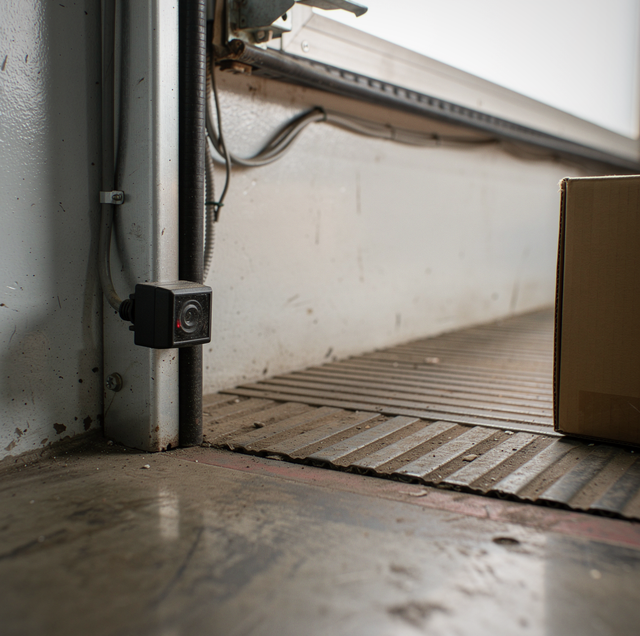
Most commercial openers include photo-eye sensors mounted near the floor on each side of the opening that create an infrared beam; if that beam is broken, dirty, or misaligned, the opener's safety logic will refuse to close the door, and on some models it will refuse to open as well until the fault clears. Dust, debris, or a stray pallet parked in front of a sensor is a common, easy-to-miss cause. Wipe both lenses clean and confirm that nothing is blocking the beam path before assuming a deeper electrical fault, since a fault that looks like "the opener won't run" is often just a blocked or misaligned sensor pair that refuses to let the cycle complete.
Step Three: Check The Limit Switches
Limit switches tell the opener where the door should stop at full open and full close. A limit switch that's drifted out of position, common after the chain or belt drive has stretched slightly over years of use, can cause the door to stop short, reverse unexpectedly, or refuse to complete a cycle at all because the opener thinks the door has already reached a limit it hasn't actually reached. This often shows up gradually: the door starts stopping an inch or two short of full close, then eventually stops responding to the close command altogether once the drift is severe enough that the opener's logic reads it as an obstruction.
Step Four: Check The Drive Chain Or Belt For Slack
Commercial door openers transmit motor power to the door through a chain, belt, or screw drive running the length of the rail. Slack in a chain or belt drive, from stretch over time or a loose take-up spring, lets the trolley (the carriage that actually pulls the door) slip instead of engaging fully, which can look exactly like a dead motor even though the motor itself is running fine. Listen for the motor running while the door doesn't move; that combination points straight at a slipping or disconnected drive rather than an electrical fault.
Step Five: Listen For The Motor, Then Diagnose By Sound
If the motor hums but doesn't turn the drive, a failing start capacitor is a common cause; capacitors weaken with age and heat cycling, and a motor that used to start instantly but now hesitates, hums, or needs a manual nudge to get going is showing classic capacitor fatigue. If there's no sound at all when the opener is commanded to run, the fault is more likely in the control board, a relay, or the power feed to the motor itself rather than the motor's mechanical components. This distinction, humming versus silent, matters because it tells a technician whether to start with the motor's electrical components or trace the circuit further back toward the control board.
Step Six: Check For Overheating From Duty Cycle Overuse
Commercial openers are rated for a specific duty cycle, a maximum number of cycles per hour before the motor needs a cooldown period. An opener pushed well beyond its rated duty cycle, common on doors that cycle constantly during a busy shift, can trip an internal thermal overload that shuts the motor down until it cools, then resumes working normally once it has, which can look like an intermittent, unexplained failure if the pattern isn't recognized. A door that consistently stops responding during the busiest part of a shift and then works again an hour later is a strong signal that the opener's duty cycle is being exceeded rather than that a part has actually failed.
Step Seven: Consider The Control Board's Age
Commercial opener control boards handle the logic connecting the wall station, photo eyes, limit switches, and motor, and like any electronic component, relays and circuit boards degrade with age, heat, and power fluctuations even when every mechanical part is in good condition. A board nearing the end of its service life often produces intermittent symptoms rather than a clean failure: the door works fine for several cycles, then skips a command, then works again, a pattern that's easy to mistake for a wiring issue or a loose connection rather than a board that's simply aging out. Facilities running an opener well past a decade of service, especially one that's cycled the whole time heavily, should treat repeated intermittent faults as a signal worth raising with a technician rather than something to keep resetting and hoping clears on its own.
What's Actually A Professional-Only Repair
Anything involving the torsion spring or cable system that counterbalances the door itself is separate from the opener and can store enough energy to cause serious injury if handled incorrectly; that work should never be attempted, regardless of how the opener issue is diagnosed. Opening the motor housing to test or replace a capacitor, tracing wiring at the control board, and adjusting limit switch settings on a commercial-grade opener also require the right tools and training, since an incorrectly set limit switch can cause the door to slam closed with more force than intended on the next cycle. The steps above are meant to narrow down what's actually wrong so a technician arrives prepared, not to substitute for the repair itself.
Anything involving the torsion spring or cable system that counterbalances the door itself is separate from the opener and can store enough energy to cause serious injury if handled incorrectly; that work should never be attempted, regardless of how the opener issue is diagnosed.
Frequently Asked Questions
Yes, and it's worth testing the wall-mounted control station separately from any remote before assuming the opener itself has failed, since a dead remote battery or a receiver that's lost its programming will stop the door from responding to that specific input, even if the opener hardware is completely fine.
On a dock door exposed to regular dust, forklift traffic, and debris, wiping the sensor lenses weekly catches buildup before it's enough to interfere with the beam, whereas on a lower-traffic interior door, a monthly check is often sufficient.
A capacitor issue typically shows as hesitation or humming that eventually resolves with a manual push to get the door moving, while a winding failure usually produces a persistent hum with no start at all, even with assistance, and often a distinct burning odor if it's progressed far.
Ratings vary by model, but many standard commercial openers are built for continuous but moderate use rather than nonstop cycling, so a bay running well above its opener's intended cycles per hour benefits from a heavier-duty operator rated specifically for high-frequency use.
Basic limit adjustment knobs exist on some commercial openers, but a technician usually wants the specific symptom first: stopping short, reversing early, or refusing to close, since that alone points to which limit has drifted before any knob gets touched. Setting a commercial-grade limit incorrectly doesn't just risk a slam; on most units it can also void the manufacturer's warranty on the drive assembly, which is one more reason facilities are better off reporting what they observed than adjusting the knob themselves.
Technicians often check the trolley's quick-release connection before touching any electrical components. That release cord gets pulled during a jam or a power outage, allowing the door to be moved by hand, and it's easy for whoever pulled it to forget to reconnect it afterward, leaving the trolley disengaged from the drive carriage. It produces the exact same symptom as a dead motor: the unit runs, but the door doesn't move. Since checking the release takes seconds, it's usually ruled out before a technician starts testing wiring or swapping parts.
Write down what was actually observed before the technician even picks up the phone: power confirmed, sensors clean or blocked, motor humming or silent, chain slack checked. That short list turns a diagnostic visit into a repair visit, since the technician shows up already knowing which two or three components to test first, rather than starting from scratch on a door that could be failing for any of seven different reasons.
Get your commercial door opener back online fast — Same-day diagnosis for motors, sensors, and drive systems on commercial door openers. Prime Dock & Door LLC serves La Mirada, Anaheim, and Santa Ana. Call (714) 683-2201.
